A Fajr alarm for iPhone

Wake for Fajr, even on the hardest mornings.

FajrPlus is a Fajr alarm app for iPhone, powered by real iOS alarms. It follows the Fajr time for your place and stops only when you are really awake.

Coming soonto the App Store for iPhone
Try a wake mode
Adhan, Quran and duas recorded for FajrPlus
The FajrPlus Alarms screen, with the Fajr alarm switched on and its wake modes set.
What makes FajrPlus different

Made for Fajr, from the first sound to the last dua.

Recorded for FajrPlus

Voices made for this app

Every adhan, Quran recitation and dua in FajrPlus was recorded for it by a reciter. Not a stock sound, not a clip from somewhere else: made for waking you for Fajr, and for falling asleep the night before.

  • Adhan in six styles, from Makkah to Jakarta
  • Quran recitations to wake to
  • Whole surahs for the night
  • The duas of waking and of the morning

Auto Fajr alarm

Set it once. It follows Fajr every day through the year, for your place and your mosque's method.

Tomorrow 05:44 · at Fajr

Islamic wake modes, stacked

Islamic Quiz, Dhikr and Type a Verse, next to Math, Shake and more. Stack them, and the alarm asks each one in turn.

Wake Check

A few minutes after the alarm, FajrPlus asks if you are up. No answer, and it rings again.

Bedtime reminder

A gentle nudge to wind down, timed from your Fajr alarm, so Fajr finds you rested.

Night sounds

Fall asleep to whole surahs, duas or nature, with a sleep timer that fades out. No music.

Why FajrPlus

Your intention is sincere. But when the alarm rings, sleep can speak louder.

One alarm is enough.

Snoozing teaches your brain to wait. More alarms teach your brain to sleep through them.

It's not weakness.

At five in the morning, the part of your brain that decides is still asleep. That is why FajrPlus asks something of you before the alarm stops.

Because it mattered.

Think of the alarm you never miss. Not because waking up was easy, but because it mattered. Fajr matters more.

Wake with intention, not with a snooze button.

FajrPlus was built for one thing: getting you up for Fajr. An alarm made to be hard to sleep through, wake modes that ask you to be really up, and a quiet moment of intention when you are.

How it works

Three steps between you and a missed Fajr.

  1. Fajr, worked out for your place

    FajrPlus calculates Fajr on your iPhone from where you are, with 11 calculation methods so it can match your mosque. Ring at Fajr or up to 30 minutes either side, or set a time by hand.

  2. It asks something of you

    Before the alarm stops, you solve, shake, walk or scan. By the time you are done, the part of you that decides is awake too.

  3. It checks you are really up

    A few minutes later, the Wake Check asks again, in case you went back to bed. If you do not confirm within five minutes, the alarm rings again.

Real iOS alarms

FajrPlus rings through the same alarm system as the iPhone's Clock app: on the Lock Screen, with the silent switch on, and in Sleep Focus.

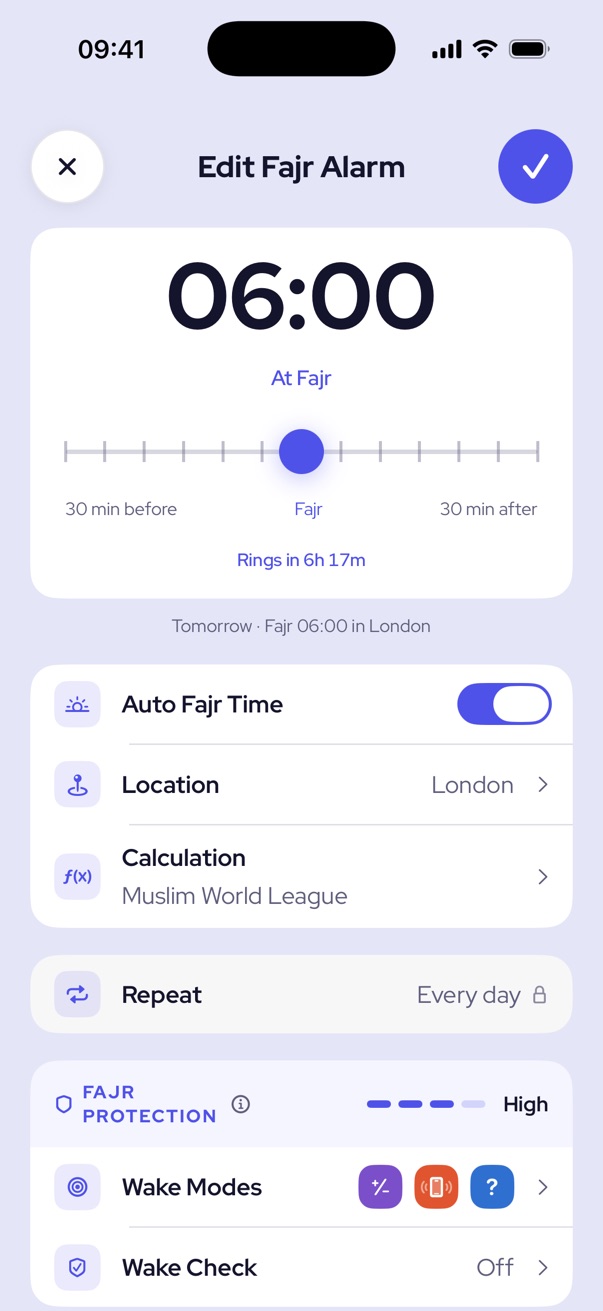
The Fajr alarm editor: 06:00 at Fajr in London, Muslim World League calculation, High Fajr Protection.
Wake modes

The alarm keeps ringing until you are done.

Pick one or stack a few, and the alarm asks each in turn. Three of them are Islamic, so waking up already turns you toward Fajr.

Math

Solve equations of increasing difficulty.

Islamic Quiz

Islamic

Answer Islamic knowledge questions.

Shake

Shake your phone to dismiss.

Face ID

A quick face scan to start waking.

Memory

Match a sequence from memory.

Dhikr

Islamic

Recite and count your morning dhikr.

Type a Verse

Islamic

Type the meaning of a short verse.

Walk

Take a set number of steps.

QR Scan

Scan a code you've placed somewhere, like the bathroom.

NFC Tag

Hold your phone to a tag you placed.

Build your Fajr Protection

Tap wake modes to add them to your Fajr alarm. Mental modes add a little, physical ones more, and the Wake Check guards against going back to sleep.

Fajr ProtectionHigh

And you are never locked out. If a QR code or tag goes missing, holding one button for a minute stops the alarm.

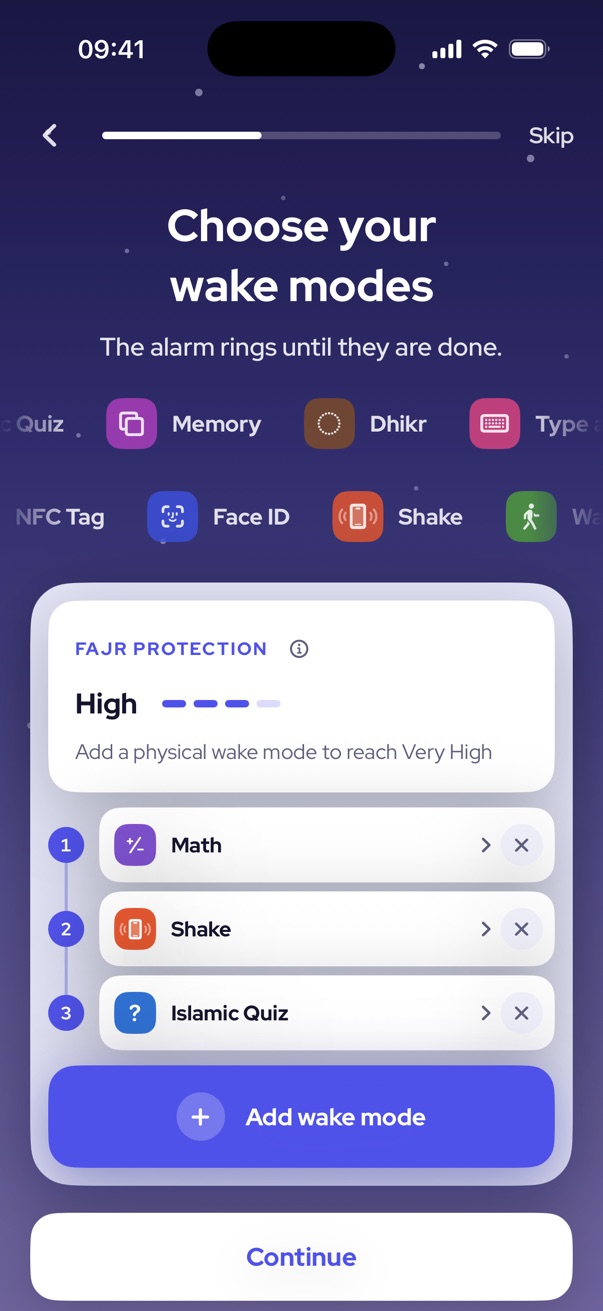
Choosing wake modes in the first run: Math, Shake and Islamic Quiz give High Fajr Protection.
Try it

Try stopping the alarm.

Pick a wake mode and ring the alarm. It keeps ringing until the wake mode is done, just like at Fajr.

No sound. One easy step, like a real morning.

05:41
Fajr alarm at 05:42
FajrPlusFajr
Math

Awake

That is the alarm done with.

الْحَمْدُ لِلَّهِ الَّذِي أَحْيَانَا بَعْدَ مَا أَمَاتَنَا وَإِلَيْهِ النُّشُورُ

“All praise is for Allah, who gave us life after causing us to die, and to Him is the resurrection.”

Sahih al-Bukhari 6324

Choosing the alarm sound: adhan in the style of six cities.
Sounds Recorded for FajrPlus

Wake to the adhan, not a beep.

Every adhan, recitation and dua was recorded for FajrPlus by a reciter, for the moment you open your eyes before dawn.

Adhan

In the style of Makkah, Madinah, Istanbul, Cairo, Fes and Jakarta. Each with its opening, or the call that prayer is better than sleep.

Quran

Recitations of Al-Fajr, Al-Isra, Qaf, Hud, Ar-Rum and Taha.

Dua

Waking Up, Morning, Forgiveness, Protection, Knowledge and Provision, Wellbeing.

Nature and animals

Dawn birds, rain, a river, ocean waves, a thunderstorm and desert wind. A rooster too.

Nights

A better Fajr begins the night before.

And a peaceful night before it.

  • Sleep soundsFall asleep to nature sounds, whole surahs or a dua. No music.
  • A sleep timerThe sound fades out gently when the timer ends. AirPlay works too.
  • Bedtime reminderFajrPlus reminds you when it is time to wind down, so Fajr finds you rested.
The Sleep tab, with a bedtime at 22:00 and whole surahs to fall asleep to.
Lock Screen

Fajr, at a glance.

  • A countdown before it rings

    Five minutes before the alarm, a Live Activity counts down on the Lock Screen and in the Dynamic Island.

  • Already up? Skip this one.

    Skip a single morning without switching the alarm off. It comes back tomorrow.

  • The Fajr widget

    The next Fajr, and when your alarm rings for it, on your Home Screen or Lock Screen.

رَكْعَتَا الْفَجْرِ خَيْرٌ مِنَ الدُّنْيَا وَمَا فِيهَا

“The two rak'ahs at dawn are better than this world and what it contains.”

Sahih Muslim 725
Free and Premium

Protect your Fajr with Premium

Your Fajr alarm is free, for good. Premium adds the Wake Check and every sound and wake mode.

FeatureFreePremium
Fajr alarm that follows FajrIncludedIncluded
Alarms3, Fajr includedAs many as you like
Wake modesMath, Islamic Quiz, Face ID and ShakeAll 10
Wake CheckNot includedAt the time you choose
Alarm soundsTwo of every kindAll of them
Sleep soundsTwo of every kindAll of them
Bedtime reminderIncludedIncluded
Colours and app iconsIndigoSix colours, each with its icon
7 days free Then one yearly plan. Cancel anytime in the App Store. Subscription terms
Privacy

Your mornings are yours.

FajrPlus works on your iPhone alone. We do not collect, keep or sell any personal information.

No account

No sign up and no sign in. Open the app and set your Fajr.

No tracking

No advertising, no analytics and no tracking. This website has none either.

Stays on your iPhone

Your alarms, your place and your history are kept on your iPhone. Deleting FajrPlus deletes them.

Read the privacy policy

At a glance

FajrPlus in short

What it is
A Fajr alarm app for iPhone that wakes you for the dawn prayer and makes sure you are really up.
Fajr time
Worked out on your iPhone from your location or a city you choose, with 11 calculation methods, or set by hand. Ring at Fajr or up to 30 minutes before or after.
Wake modes
10, and they stack: Math, Islamic Quiz, Memory, Dhikr, Type a Verse, Face ID, Shake, Walk, QR Scan and NFC Tag.
Sounds
Adhan in six styles, Quran recitations and duas, all recorded for FajrPlus, plus nature and animal sounds.
Also
Wake Check, bedtime reminder, night sounds with a sleep timer, a Lock Screen countdown and a Fajr widget.
Price
Free to use, with FajrPlus Premium as a yearly subscription with 7 days free.
Privacy
No account, no tracking, no analytics. Your alarms stay on your iPhone.
Availability
Coming soon to the App Store, for iPhone.
Questions

Questions about FajrPlus

Will the alarm ring on Silent or in a Focus?

Yes. FajrPlus uses the same alarm system as the iPhone's Clock app, so it rings on the Lock Screen, with the silent switch on, and in Sleep Focus. Only the Alarms permission has to be allowed.

Where does the Fajr time come from?

It is calculated on your iPhone from the sun's position for your place: Fajr is when the sun is a set angle below the horizon before sunrise. The angle depends on the calculation method, which is why mosques differ by a few minutes. Pick the method your mosque uses. Nothing is sent anywhere.

What if I cannot find my QR code or NFC tag?

You are never locked out. After a few wrong scans or reads, a hold button appears: keep a finger on it for a minute and the alarm is dismissed.

What is the Wake Check?

A second ask a few minutes after the alarm stops, in case you finished the wake mode half asleep and went back to bed. A notification arrives at the time you chose, and if you do not confirm within five minutes the alarm rings again.

Does it ring on my Apple Watch?

No. iOS rings an app's alarms on the iPhone only; the Clock app's alarms are the one kind it sends to the watch. Keep your iPhone within earshot at night.

What is free?

The Fajr alarm that follows Fajr, up to three alarms, the Math, Islamic Quiz, Face ID and Shake wake modes, two sounds of every kind and the bedtime reminder. Premium adds the Wake Check, every sound and wake mode, and colours with matching app icons. It starts with 7 days free.

Can FajrPlus wake me for Tahajjud or at other times?

Yes. Besides the Fajr alarm, you can set other alarms for any time, with the same wake modes and sounds. The free version includes three alarms, the Fajr alarm among them.

When can I download FajrPlus?

FajrPlus is coming soon to the App Store, for iPhone. It is built on the new alarm system in iOS 26.

More questions and support

Let's make tomorrow different.

Your first protected Fajr begins by getting up.

Coming soon to the App Store